


前几天使用 OpenWrt 测试 GRE 功能时发现,在 4G 网络和有线网之间切换会导致掉线,遂简单排查了一下问题所在。
情景复现 #
本机
系统:OpenWrt
有线网卡(wan):eth1,IP:192.168.0.194,子网掩码:255.255.255.0,网关:192.168.0.1
有线网卡(lan):br-lan,IP:192.168.3.1,子网掩码:255.255.255.0
无线网卡(wwan):usb0,IP:10.221.139.224,子网掩码:255.255.255.0,网关:10.221.139.1
无线网卡使用中国移动 4G 卡上网
GRE 对端
系统:OpenWrt
有线网卡(wan):eth1,IP:192.168.0.242,子网掩码:255.255.255.0,网关:192.168.0.1
有线网卡(lan):br-lan,IP:192.168.2.218,子网掩码:255.255.255.0
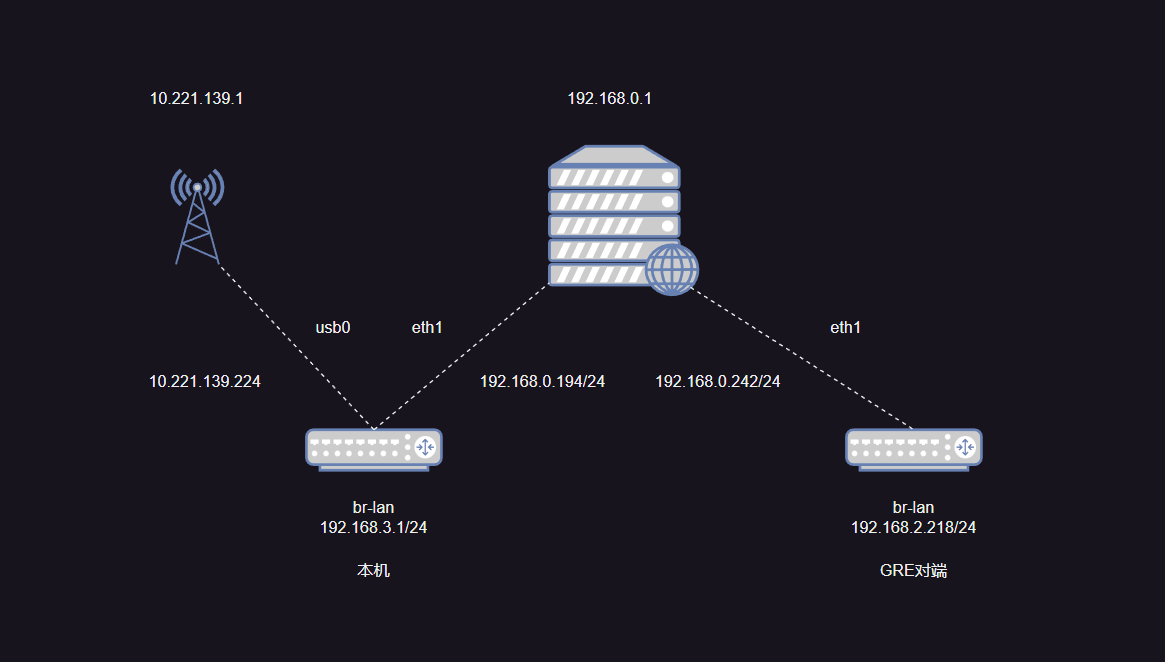
本机 GRE 配置
cat /etc/config/network

config interface 'gresbksg'
        option disabled '0'
        option peeraddr '192.168.0.242' // 对端IP
        option proto 'gre'
        option mtu '1280'
        option peerlocalip '192.168.2.0' // 对端
        option peerlocalmask '255.255.255.0'
        option zone 'wan'

config interface 'gresbksg_grestatic'
        option ifname '@gresbksg'
        option disabled '0'
        option ipaddr '192.168.5.1' // GRE隧道IP,对端为192.168.5.2
        option netmask '255.255.255.0'
        option proto 'static'
        option zone 'wan'
GRE 正常建立,流量走 eth1,此时的路由表:
root@pg-2049671F7524:~# route -n
Kernel IP routing table
Destination     Gateway         Genmask         Flags Metric Ref    Use Iface
0.0.0.0         192.168.0.1     0.0.0.0         UG    10     0        0 eth1
0.0.0.0         10.221.139.1    0.0.0.0         UG    12     0        0 usb0
10.221.139.0    0.0.0.0         255.255.255.0   U     12     0        0 usb0
192.168.0.0     0.0.0.0         255.255.255.0   U     10     0        0 eth1
192.168.2.0     0.0.0.0         255.255.255.0   U     0      0        0 gre4-gresbksg
192.168.3.0     0.0.0.0         255.255.255.0   U     0      0        0 br-lan
192.168.5.0     0.0.0.0         255.255.255.0   U     0      0        0 gre4-gresbksg
此时本机可以直接 ping 通对端的 lan 口,
root@pg-2049671F7524:~# ping 192.168.2.218
PING 192.168.2.218 (192.168.2.218): 56 data bytes
64 bytes from 192.168.2.218: seq=0 ttl=64 time=1.481 ms
64 bytes from 192.168.2.218: seq=1 ttl=64 time=4.312 ms
64 bytes from 192.168.2.218: seq=2 ttl=64 time=2.344 ms
64 bytes from 192.168.2.218: seq=3 ttl=64 time=1.579 ms
64 bytes from 192.168.2.218: seq=4 ttl=64 time=3.409 ms
--- 192.168.2.218 ping statistics ---
5 packets transmitted, 5 packets received, 0% packet loss
round-trip min/avg/max = 1.481/2.625/4.312 ms
路由追踪:
root@pg-2049671F7524:~# traceroute 192.168.2.218
traceroute to 192.168.2.218 (192.168.2.218), 30 hops max, 38 byte packets
 1  192.168.2.218 (192.168.2.218)  1.173 ms  2.722 ms  2.603 ms
拔掉 wan 口网线后,此时正常情况下应该无法 ping 通,因为 GRE 在内网中,路由表:
root@pg-2049671F7524:~# route -n
Kernel IP routing table
Destination     Gateway         Genmask         Flags Metric Ref    Use Iface
0.0.0.0         10.77.102.1     0.0.0.0         UG    12     0        0 usb0
10.77.102.0     0.0.0.0         255.255.255.0   U     12     0        0 usb0
192.168.0.242   10.77.102.1     255.255.255.255 UGH   12     0        0 usb0
192.168.2.0     0.0.0.0         255.255.255.0   U     0      0        0 gre4-gresbksg
192.168.3.0     0.0.0.0         255.255.255.0   U     0      0        0 br-lan
192.168.5.0     0.0.0.0         255.255.255.0   U     0      0        0 gre4-gresbksg
将网线接回去后,还是无法 ping 通,此时的路由表:
root@pg-2049671F7524:~# route -n
Kernel IP routing table
Destination     Gateway         Genmask         Flags Metric Ref    Use Iface
0.0.0.0         192.168.0.1     0.0.0.0         UG    10     0        0 eth1
0.0.0.0         10.77.102.1     0.0.0.0         UG    12     0        0 usb0
10.77.102.0     0.0.0.0         255.255.255.0   U     12     0        0 usb0
192.168.0.0     0.0.0.0         255.255.255.0   U     10     0        0 eth1
192.168.0.242   10.77.102.1     255.255.255.255 UGH   12     0        0 usb0
192.168.2.0     0.0.0.0         255.255.255.0   U     0      0        0 gre4-gresbksg
192.168.3.0     0.0.0.0         255.255.255.0   U     0      0        0 br-lan
192.168.5.0     0.0.0.0         255.255.255.0   U     0      0        0 gre4-gresbksg
可以发现,我们在拔掉网线后,路由表内自动添加了一条 host 路由
192.168.0.242 10.77.102.1 255.255.255.255 UGH 12 0 0 usb0
但是由于我们的 GRE 对端是建立在内网中的,4G 网络肯定是无法访问的,所有这条 host 路由是错误的。
当我们将网线接回后,由于已经存在了一条 host 路由,所有访问 192.168.0.242 的流量会从 usb0 出去,导致 GRE 隧道无法建立。
怎么使系统正确添加 host 路由? #
思路一:关闭自动添加 host 路由 #
查看 OpenWrt 源码中的 gre 脚本(openwrt/package/network/config/gre/files/gre.sh)
gre_setup() {
	local cfg="$1"
	local mode="$2"
	local remoteip

	local ipaddr peeraddr peerlocalip peerlocalmask
	json_get_vars df ipaddr peeraddr tunlink nohostroute peerlocalip peerlocalmask

	[ -z "$peeraddr" ] && {
		proto_notify_error "$cfg" "MISSING_PEER_ADDRESS"
		proto_block_restart "$cfg"
		exit
	}

	remoteip=$(resolveip -t 10 -4 "$peeraddr")

	if [ -z "$remoteip" ]; then
		proto_notify_error "$cfg" "PEER_RESOLVE_FAIL"
		exit
	fi

	for ip in $remoteip; do
		peeraddr=$ip
		break
	done

	if [ "${nohostroute}" != "1" ]; then
		( proto_add_host_dependency "$cfg" "$peeraddr" "$tunlink" )
	fi

	[ -z "$ipaddr" ] && {
		local wanif="$tunlink"
		if [ -z $wanif ] && ! network_find_wan wanif; then
			proto_notify_error "$cfg" "NO_WAN_LINK"
			exit
		fi

		if ! network_get_ipaddr ipaddr "$wanif"; then
			proto_notify_error "$cfg" "NO_WAN_LINK"
			exit
		fi
	}

	[ -z "$df" ] && df="1"

	case "$mode" in
		gretapip)
			gre_generic_setup $cfg $mode $ipaddr $peeraddr "gre4t-$cfg"
			route add -net "$peerlocalip" netmask "$peerlocalmask" dev "gre4t-$cfg"
			;;
		*)
			gre_generic_setup $cfg $mode $ipaddr $peeraddr "gre4-$cfg"
			route add -net "$peerlocalip" netmask "$peerlocalmask" dev "gre4-$cfg"
			;;
	esac
}
可以看到,只有在 nohostroute 为非 1 时,才会添加 host 路由
以下是 ChatGPT 的回答:
proto_add_host_dependency是 OpenWrt 中的一个函数,它用于向当前接口的依赖列表中添加一个 host 依赖项。
在 OpenWrt 中,每个接口都有一个依赖列表,用于记录这个接口所依赖的其他接口或主机。当这个接口启动时,系统会检查它的依赖列表,如果依赖项中有任何一个接口或主机不可达,这个接口就无法启动。这种机制可以保证网络的连通性和稳定性。
proto_add_host_dependency函数用于向当前接口的依赖列表中添加一个 host 依赖项。它接受三个参数:当前接口的配置名称、依赖主机的 IP 地址、依赖主机所在的网络接口名称。例如,以下命令将当前接口eth0添加一个 host 依赖项,依赖主机的 IP 地址是192.168.1.1,所在的网络接口名称是eth1:
proto_add_host_dependency "eth0" "192.168.1.1" "eth1"
在 GRE 隧道的配置中,proto_add_host_dependency函数通常用于将对端 IP 地址添加到当前隧道的依赖列表中。这样,当对端不可达时,当前隧道就无法启动,从而避免了无效的隧道连接。
在你的问题中,proto_add_host_dependency函数用于向当前 GRE 隧道的依赖列表中添加对端 IP 地址的 host 依赖项。如果nohostroute字段没有设置为1,系统会自动添加这个 host 路由,使得对端 IP 地址可达。如果nohostroute字段设置为1,则需要手动使用proto_add_host_dependency函数将对端 IP 地址添加到依赖列表中,否则 GRE 隧道无法启动。
OpenWrt 官方是这样解释这个参数的:
| Name | Type | Required | Default | Description |
|---|---|---|---|---|
| nohostroute | boolean | no | 0 | Do not add routes to ensure the tunnel endpoints are routed via non-tunnel device |
于是我尝试了更改 GRE 的配置:
config interface 'gresbksg'
        option disabled '0'
        option peeraddr '192.168.0.242'
        option proto 'gre'
        option mtu '1280'
        option peerlocalip '192.168.2.0'
        option peerlocalmask '255.255.255.0'
        option zone 'wan'
        option nohostroute '1'

config interface 'gresbksg_grestatic'
        option ifname '@gresbksg'
        option disabled '0'
        option ipaddr '192.168.5.1'
        option netmask '255.255.255.0'
        option proto 'static'
        option zone 'wan'
修改完成后重启 network,发现是可以正常使用的。此时的路由表:
root@pg-2049671F7524:~# route -n
Kernel IP routing table
Destination     Gateway         Genmask         Flags Metric Ref    Use Iface
0.0.0.0         192.168.0.1     0.0.0.0         UG    10     0        0 eth1
0.0.0.0         10.162.134.1    0.0.0.0         UG    12     0        0 usb0
10.162.134.0    0.0.0.0         255.255.255.0   U     12     0        0 usb0
192.168.0.0     0.0.0.0         255.255.255.0   U     10     0        0 eth1
192.168.2.0     0.0.0.0         255.255.255.0   U     0      0        0 gre4-gresbksg
192.168.3.0     0.0.0.0         255.255.255.0   U     0      0        0 br-lan
192.168.5.0     0.0.0.0         255.255.255.0   U     0      0        0 gre4-gresbksg
将网线拔掉后,路由表已经不会自动添加 host 路由了:
root@pg-2049671F7524:~# route -n
Kernel IP routing table
Destination     Gateway         Genmask         Flags Metric Ref    Use Iface
0.0.0.0         10.162.134.1    0.0.0.0         UG    12     0        0 usb0
10.162.134.0    0.0.0.0         255.255.255.0   U     12     0        0 usb0
192.168.2.0     0.0.0.0         255.255.255.0   U     0      0        0 gre4-gresbksg
192.168.3.0     0.0.0.0         255.255.255.0   U     0      0        0 br-lan
192.168.5.0     0.0.0.0         255.255.255.0   U     0      0        0 gre4-gresbksg
然后再接回网线,查看路由表:
root@pg-2049671F7524:~# route -n
Kernel IP routing table
Destination     Gateway         Genmask         Flags Metric Ref    Use Iface
0.0.0.0         192.168.0.1     0.0.0.0         UG    10     0        0 eth1
0.0.0.0         10.162.134.1    0.0.0.0         UG    12     0        0 usb0
10.162.134.0    0.0.0.0         255.255.255.0   U     12     0        0 usb0
192.168.0.0     0.0.0.0         255.255.255.0   U     10     0        0 eth1
192.168.2.0     0.0.0.0         255.255.255.0   U     0      0        0 gre4-gresbksg
192.168.3.0     0.0.0.0         255.255.255.0   U     0      0        0 br-lan
192.168.5.0     0.0.0.0         255.255.255.0   U     0      0        0 gre4-gresbksg
可以发现因为没有错误的 host 路由,我们的 GRE 隧道又能正常建立连接了。尝试 ping 一下对端的 LAN 口:
root@pg-2049671F7524:~# ping 192.168.2.218
PING 192.168.2.218 (192.168.2.218): 56 data bytes
64 bytes from 192.168.2.218: seq=0 ttl=64 time=1.810 ms
64 bytes from 192.168.2.218: seq=1 ttl=64 time=3.701 ms
64 bytes from 192.168.2.218: seq=2 ttl=64 time=6.526 ms
64 bytes from 192.168.2.218: seq=3 ttl=64 time=4.254 ms
--- 192.168.2.218 ping statistics ---
4 packets transmitted, 4 packets received, 0% packet loss
round-trip min/avg/max = 1.810/4.072/6.526 ms
疑惑:为什么用有线时,不会添加 host 路由?
思路二:将 GRE 隧道绑定到某个接口上 (未成功) #
可以使用参数tunlink
| Name | Type | Required | Default | Description |
|---|---|---|---|---|
| tunlink | string | no | (none) | Bind the tunnel to the specified interface, OpenWrt 21.02+ |
修改 network 中 gre 的配置,将 GRE 隧道绑定到本地网络接口 eth1 上: